Parakh lo, before you click

We break the scam before you click.

One wrong click can drain a bank account. Officer MAGI — the AI built into Parakh — checks every link from SMS, WhatsApp, email and ads against the whole scammer playbook, right on your phone or tablet, and tells you in plain words whether it’s safe. For you, your parents and your kids.

Private, on your device No ads, ever Made for families

A MagenSec app, built by XenoCraft Labs. We never keep or sell your links.

Ninety seconds

What Parakh is, in a minute and a half.

The same introduction new users see inside the app, before their first lesson.

Sound familiar?

These messages arrive every single day.

“Your electricity will be cut tonight. Pay now.”

A link that looks official — and empties the account of anyone in a rush.

“Mummy, this is my new number. Please send money.”

A stranger posing as your child. Parents are the target.

“Congratulations! Claim your scholarship here.”

A fake form that harvests a student's details and OTP.

“Unpaid traffic fine — pay to avoid court.”

An official-looking link that just wants your card number.

You can’t always tell which link is safe. Now you don’t have to.

11.74 lakh suspected fraud calls and messages reported by Indians to the Government’s own Chakshu portal
₹4,725 croreabout $590 million already taken from 14.47 lakh Indians and clawed back only because they reported it to 1930 fast enough, up to 31 March 2025

Reported-fraud figure: Department of Telecommunications (Chakshu). Recovery figure: Ministry of Home Affairs Annual Report 2024–25, section 13.4.3, converted at ₹80 to the US dollar. That is only the money that was caught in time. A country does not build a dedicated fraud helpline for a small problem.

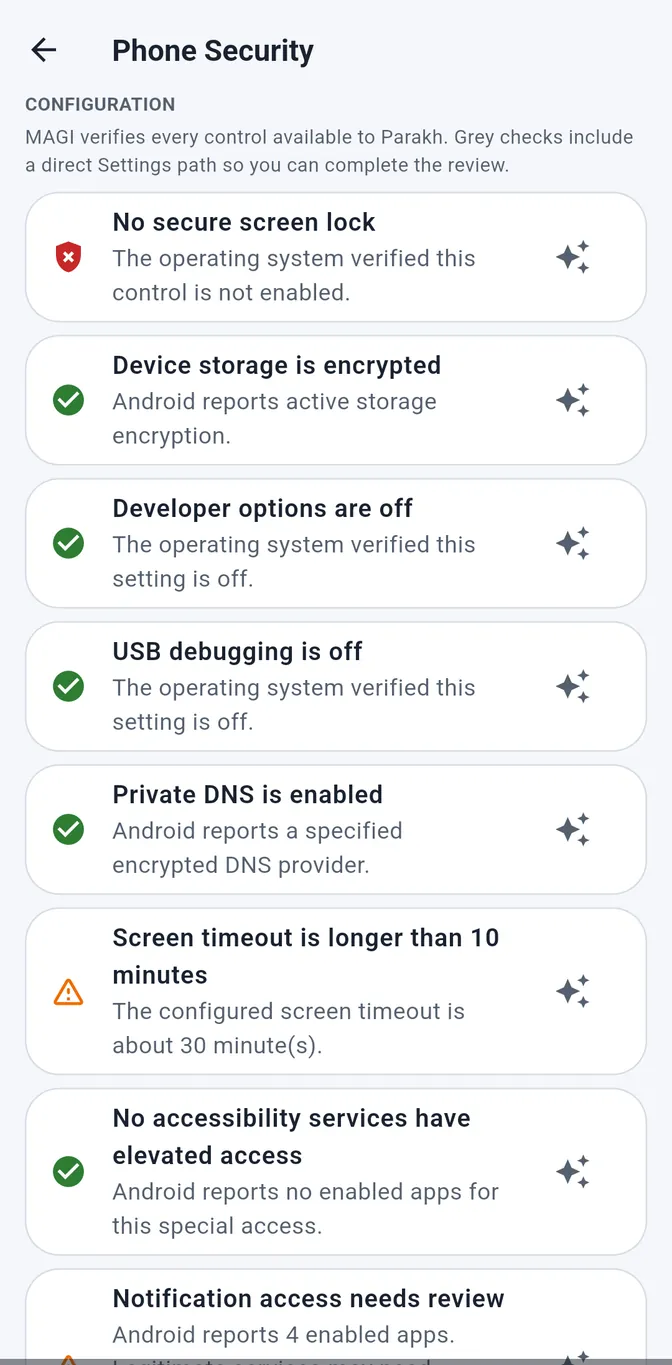
Phone Security

Most scams succeed because of a setting, not a click.

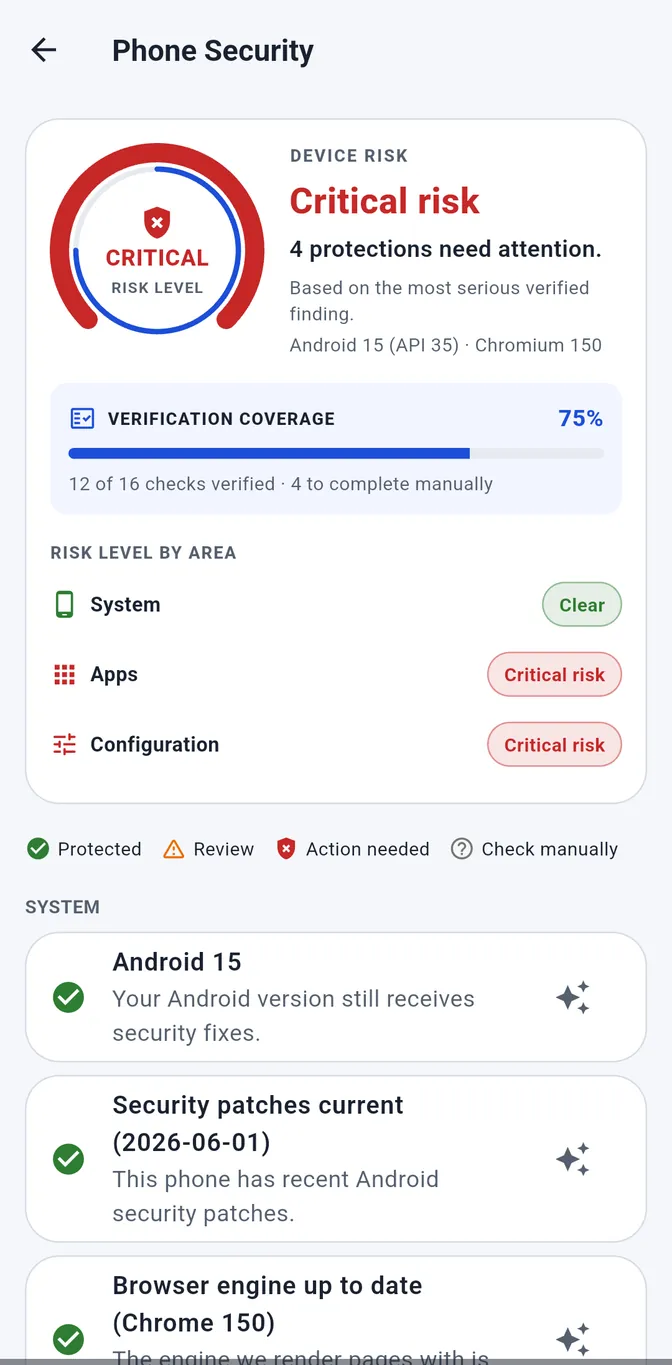
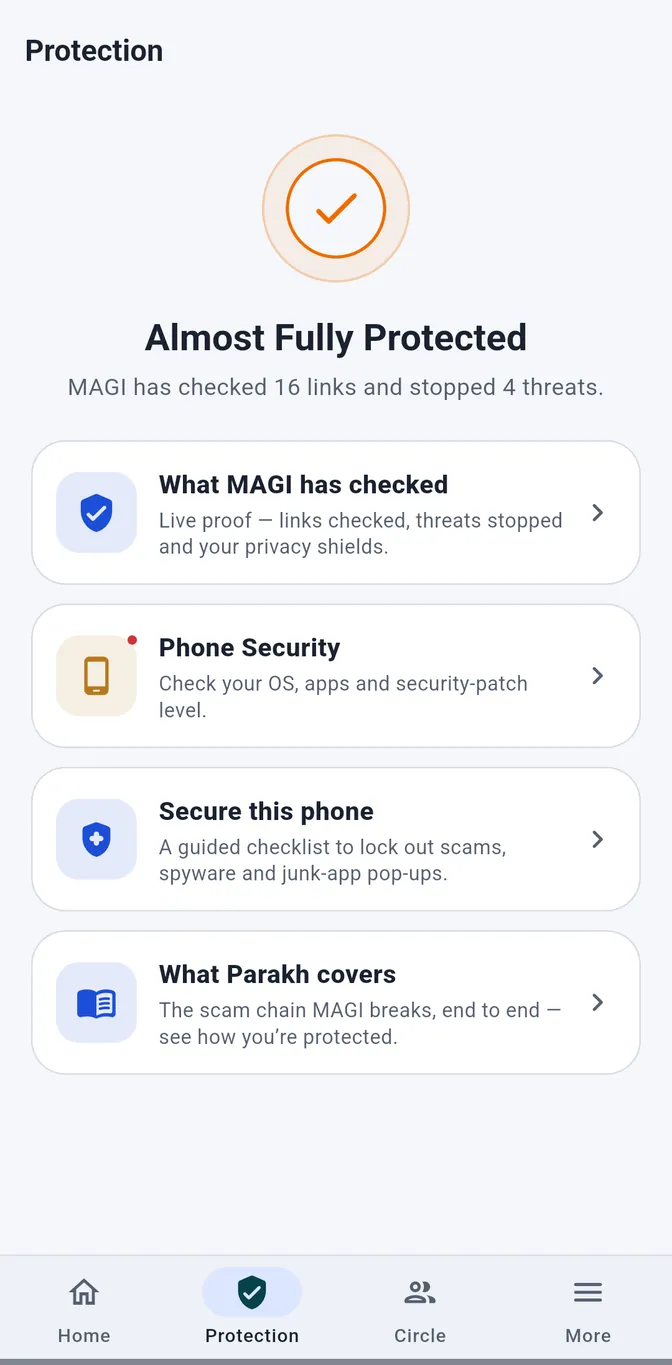
Most scams do not break in. They walk in through a setting nobody changed. Parakh checks the phone itself — the doors, not just the visitor — and shows you which ones are still open.

  • One honest risk levelTaken from the most serious finding we actually verified — not an average that hides the one thing that matters.
  • Verification coverage, stated out loud“12 of 16 checks verified”. Android does not let any app read everything, and we would rather tell you that than quietly score the gaps as safe.
  • System, apps and configuration, separatelyA clear area and a critical one are different problems. Averaging them into one number would bury the second.
  • Every finding comes with the stepsNot just “remote access app installed”, but what it is, why it matters, and exactly where to turn it off.

What It Actually Finds

On The Phone

  • Signs of root or an unlocked bootloader — the protection that keeps one app out of another’s data
  • Security patches months behind, or an Android version past support
  • Google Play Protect switched off
  • “Install unknown apps” left on for an app that has no business sideloading
  • Developer options and USB debugging left enabled

In Your Apps

  • Remote-access tools like AnyDesk or TeamViewer — the app at the centre of almost every “digital arrest” scam
  • An app holding SMS, accessibility and screen-overlay access at once — everything needed to read your OTP and tap for you
  • Apps that arrived as a file instead of from a store
  • Apps signed by nobody you can name
  • Known security holes in apps you already trust, matched to the real advisory

On The Link Itself

  • A certificate that is missing, expired or issued for a different name
  • A link bounced through a hidden middle site to disguise where it lands
  • A page asking for a card or an OTP on a domain created weeks ago
  • A site your secure DNS already blocks — treated as confirmation, not coincidence
  • A connection quietly downgraded from HTTPS

In What Arrives

  • Installer and program files reaching you from a link instead of a store
  • A file whose name does not match what is actually inside it
  • A double extension dressing a program up as a photo or invoice
  • Documents carrying macros — still one of the most common ways malware travels
  • Anything arriving over plain, unencrypted HTTP

Parakh reports signs and settings, not certainties. Where Android will not let any app see the answer, it says so instead of scoring the gap as safe.

How it Works

Three taps. A clear answer. No jargon.

Parakh stays out of your way and steps in the instant a link needs a second look. You will forget it is there, right up until the moment it saves you.

  1. Tap the link like always

    From SMS, WhatsApp, email or a QR code. If it's risky, Parakh steps in before the page can load.

  2. MAGI checks it in a second

    Parakh’s AI weighs who the link claims to be against where it really goes — on your device, before the page can load.

  3. You get a plain-words verdict

    Safe, careful or dangerous — in language anyone can understand. Carry on, or back out. You decide.

See it in action

A real scam text, caught in seconds.

This is an actual trading-scam SMS. Watch Parakh unmask the shortened link — the exact trick scammers use to hide where a link really goes.

The part people worry about

It has to let the real ones through.

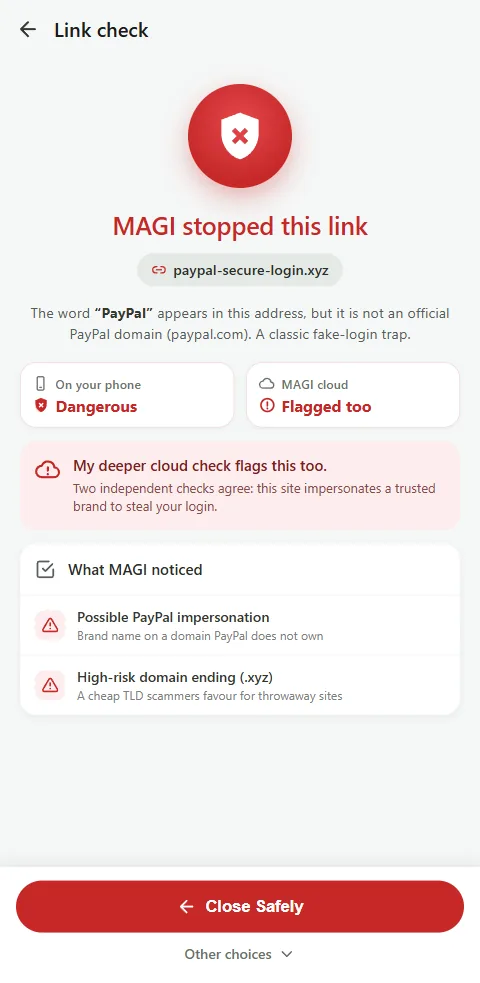
Blocking everything would be easy. These two texts are from the same bank, on the same day. Parakh stops one and hands the other straight to your usual browser — and the only difference is the address.

ICICI-KYC

ICICI Bank: Your account will be BLOCKED today. Complete your KYC now:

icici-verify-kyc.top

Blocked — fake bank page

  • Pretends to be ICICI Bank
  • Brand-new “.top” domain, only hours old
  • Asks for your KYC details and OTP
ICICIB

ICICI Bank: Rs.2,450 debited from A/c XX8821 on 01-Sep. Not you? Report it here:

icicibank.com/report

Safe — opens as usual

  • The bank’s own domain, years old
  • Valid certificate, no lookalike spelling
  • Asks for nothing on the way through

Safe links open in the browser you already use. Parakh only steps in when something is wrong — and it tells you which of these two you are looking at before the page loads.

Who Parakh protects

Built for the people scammers target most.

One simple app that quietly looks after everyone in your life — whatever their age or how comfortable they are with technology.

Parents & elders

Warnings read aloud, the extra choices taken off the screen and the strongest protection on — so they can’t be rushed.

Children

On the phone or tablet they use, a gentle guardrail against prize scams, fake logins and dodgy downloads.

Professionals

One bad link from a client or “tax office” can cost a fortune. Check first, worry never.

Students

Scholarship, job and UPI scams are aimed straight at you. Parakh spots them.

Whole families

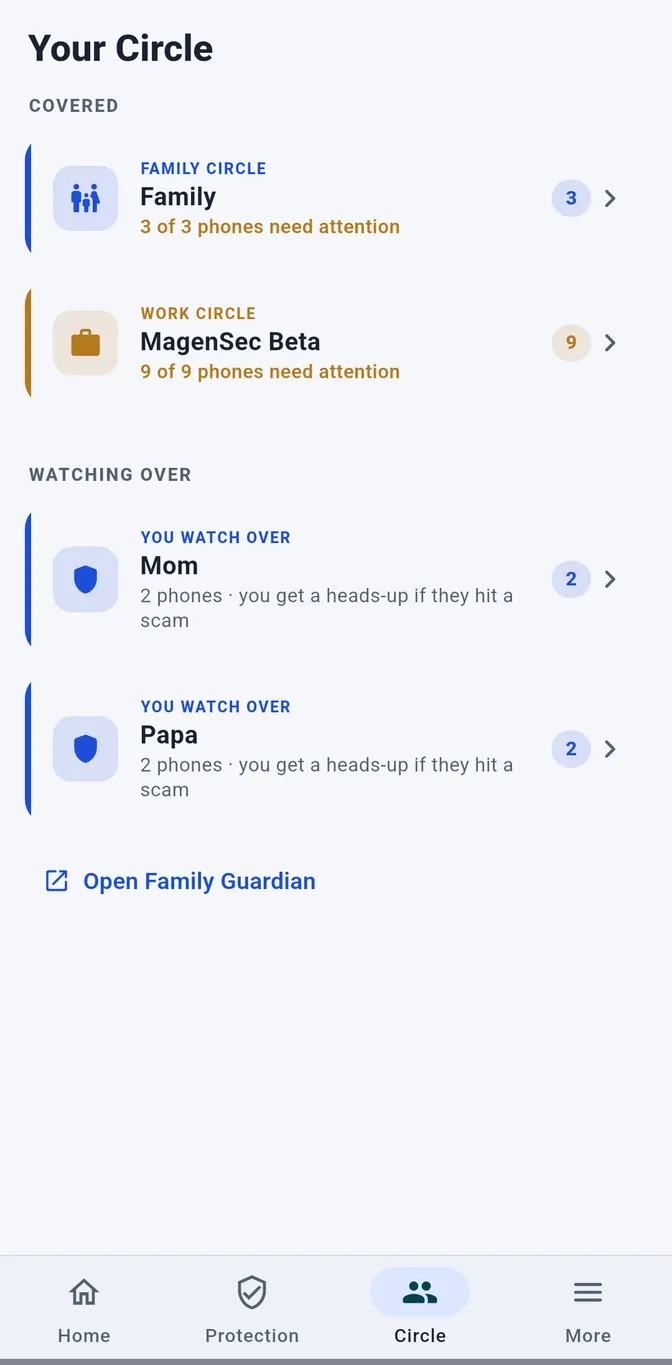
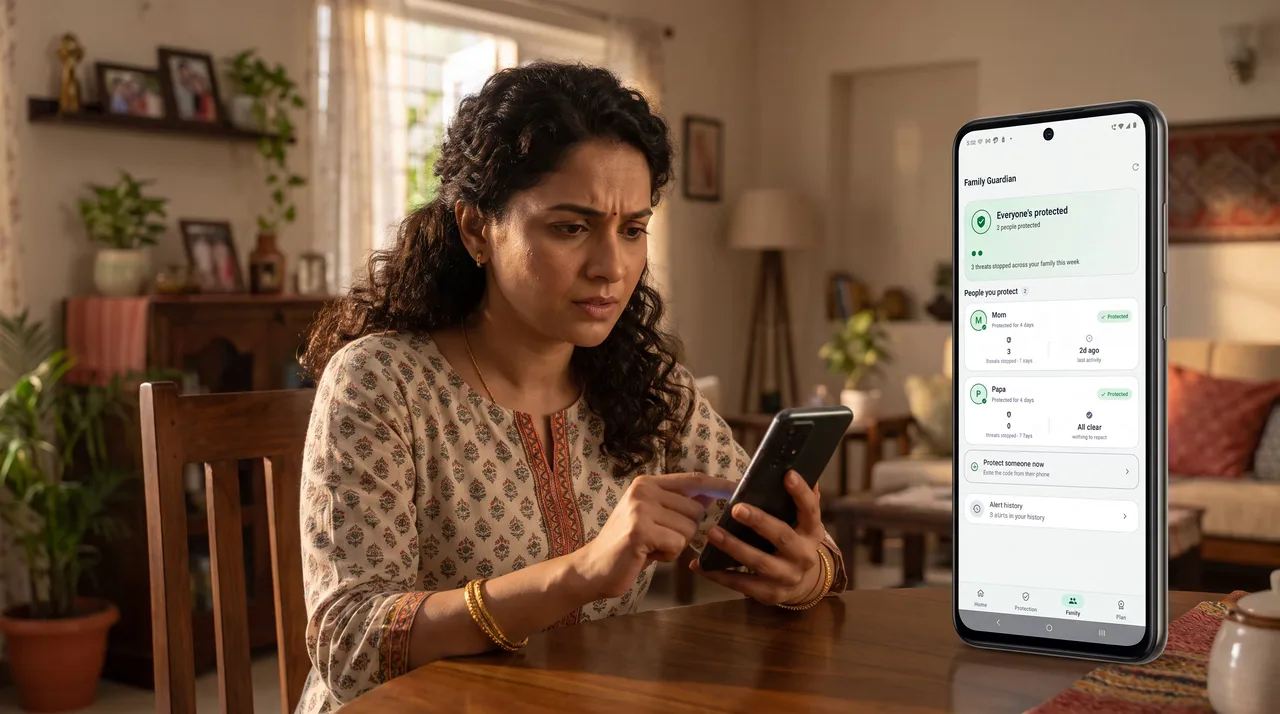
Each phone has its own licence; a Circle brings them together so one person can see who is covered — and hears about it if a loved one hits a scam.

What Parakh checks

Four questions, answered before you trust a link.

Scams work by hiding one of these. Parakh looks at all four in a moment, on your phone, and shows you what doesn't add up.

01 · IDENTITY

Who it claims to be

Your bank? A courier? The tax office? Parakh reads the claim behind the link.

02 · DESTINATION

Where it really goes

It unmasks shortened and look-alike links and follows every redirect to the real address.

03 · REQUEST

What it's asking for

A password, OTP, UPI PIN, card or app install? Parakh flags the traps before the form loads.

04 · BEHAVIOUR

How it behaves

Hidden scripts, sudden app jumps, brand-new scam sites with a fresh padlock — Parakh sees through them.

Two ways to be safe

Ask before you tap. Forget to ask, and we still catch it.

Good advice says “check first”. Real life says you were busy, the message looked urgent, and you tapped. Parakh is built for both — so being careful is easy, and being human is survivable.

If you ask first

Send us the message. Get a straight answer.

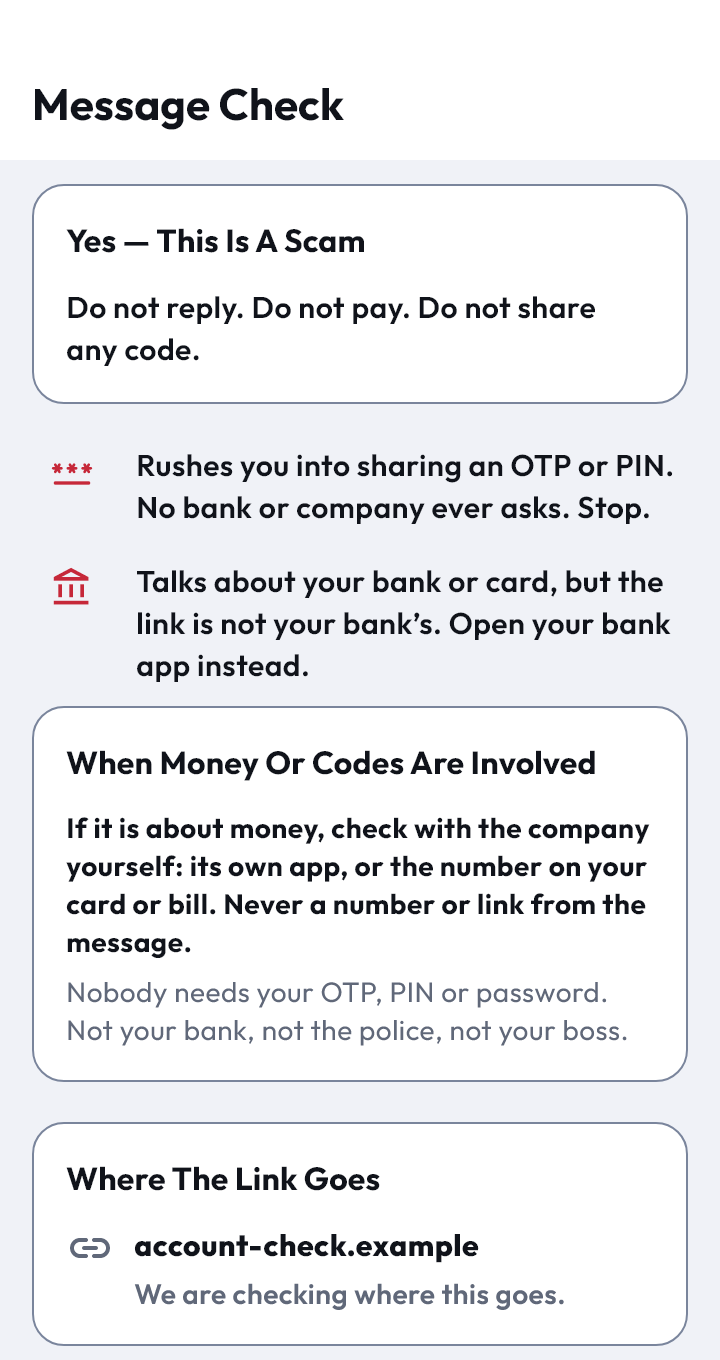
Forward any text, or select it and choose Parakh. You get a verdict in plain words — this is a scam, be careful, or it’s just an advert — plus what the link really is and what the page would ask you for.

  • Reads the words and unmasks the link behind them
  • Opens the destination on our servers, never on your phone
  • Reads the answer aloud for anyone who prefers listening

If you just tap

The net is already under you.

Make Parakh your browser and every link — from SMS, WhatsApp, email or a QR code — goes through the same check on its way to opening. A dangerous page is stopped before it loads, not after.

  • No extra step, no habit to remember
  • Works on the links other people send your family
  • An alert reaches whoever looks after them

And when something new gets through

No checker catches everything — anyone who tells you otherwise is selling something. What matters is how fast a miss becomes a rule. Report it from the app, and the correction reaches every Parakh phone within the hour, with no app update to install and nothing for you to do.

When Nothing Looks Wrong

The hardest fake shop is the one with nothing wrong with it.

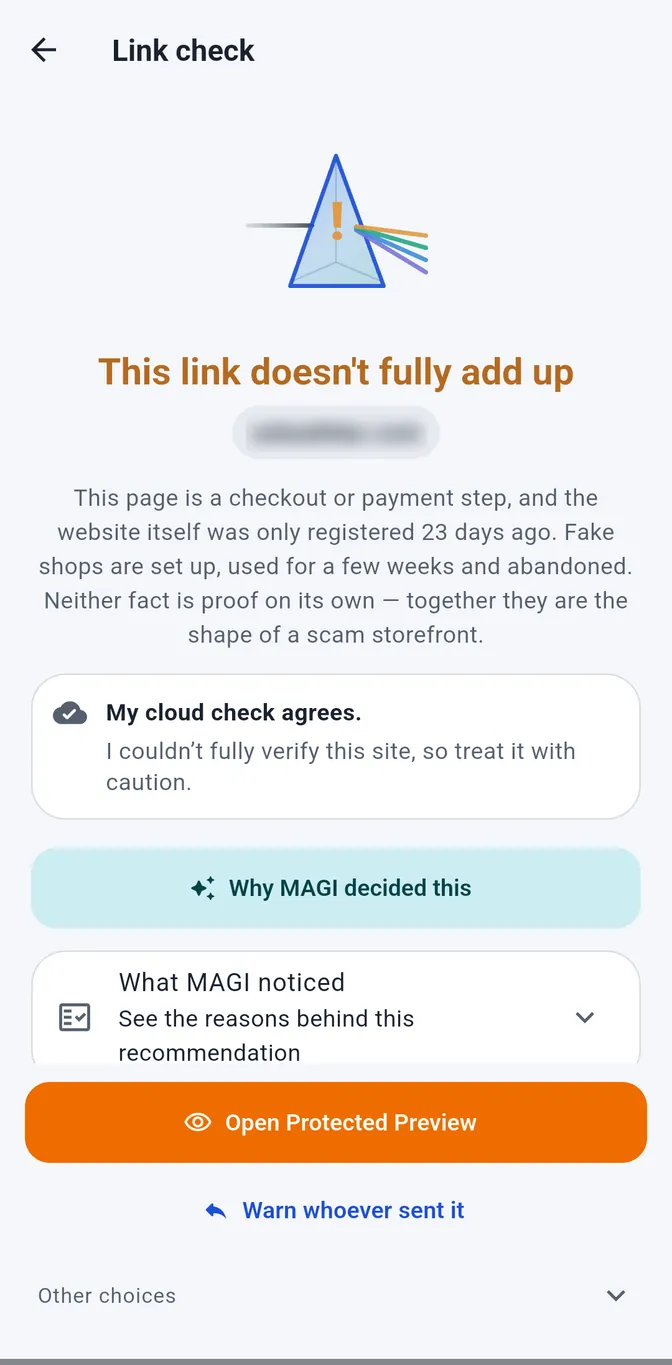
A counterfeit store set up last week has a valid padlock, a clean record and no complaints yet — because there has not been time for any. Every check passes. The only thing that gives it away is its age.

  • We tell you how old the site isAlmost every real bank, brand and shop has been online for years. A scam shop is usually days or weeks old.
  • Amber, never redBeing new is not proof of anything — every honest shop was new once. Parakh tells you, it does not accuse, and it never blocks the page.
  • Advice that is right either wayLook around all you like. Just don’t hand over a card, UPI PIN or OTP until you are sure — good counsel whether the shop turns out real or not.
  • Or open it safely inside ParakhOne tap keeps the page in Parakh’s protected view, with the reminder still on screen while you browse.
9:41
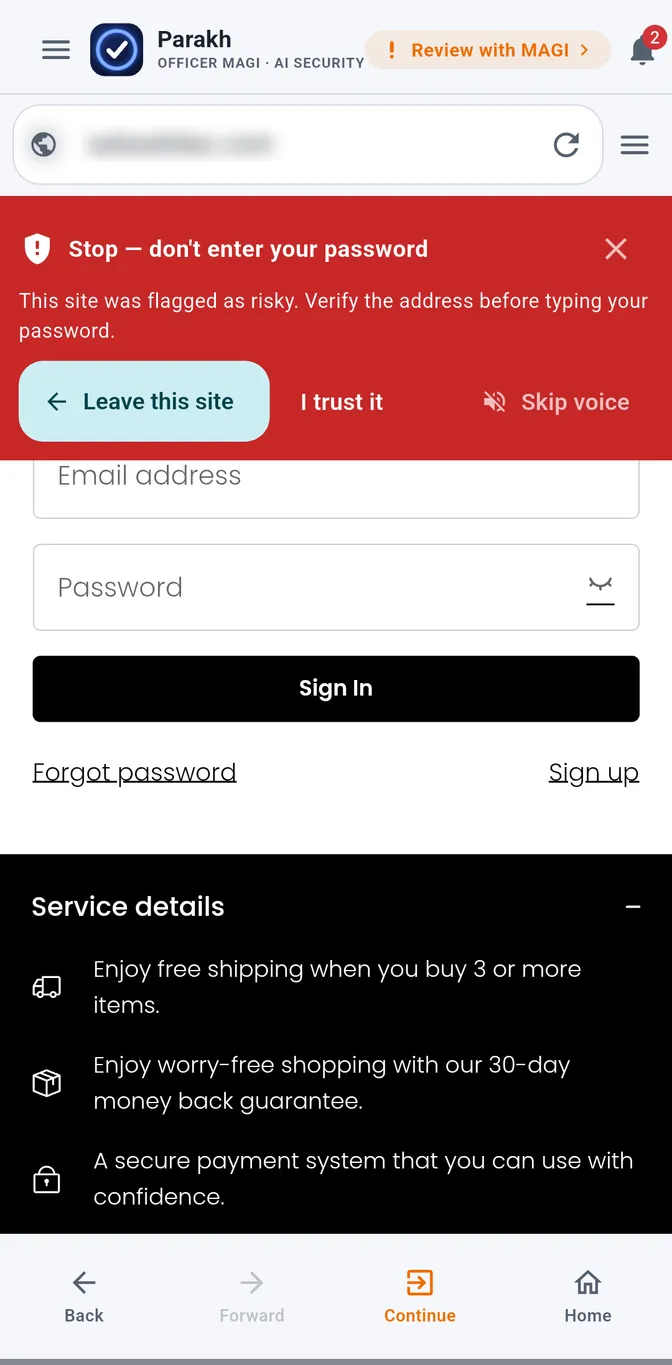
Parakh stopping a checkout link: this link doesn't fully add up, the website was only registered 23 days ago Parakh warning on the sign-in form: stop, don't enter your password

Real screens from a real counterfeit shop we were sent. Only the address is blurred — we will not put a live business on our own site and let you assume the worst about it.

MAGI remembers

A scam is never sent once. Parakh only has to catch it once.

The same fake parcel notice goes out to a hundred thousand phones, re-worded a dozen times, from a dozen new domains. Defences built on lists have to learn every single version from scratch. MAGI learns the shape of it — so the next version is recognised on a website nobody has ever seen, in words nobody has ever read.

  • A fingerprint, not your messageWhat MAGI keeps is a string of numbers describing how a scam is built. There is no way back from it to the words — not for us, not for anyone.
  • Only the scams. Never the rest.Safe messages are never fingerprinted and never kept. If it was not a scam, there is nothing to remember.
  • One catch protects everyoneThe moment a campaign is caught on one phone, every other Parakh phone already knows the shape of it — whether that is your circle, your team, or a stranger three states away who happened to be hit first.
  • And then it forgetsA memory lasts while the campaign is still going around and is deleted within six months either way. It exists to catch an attack in progress, not to keep a record of you.

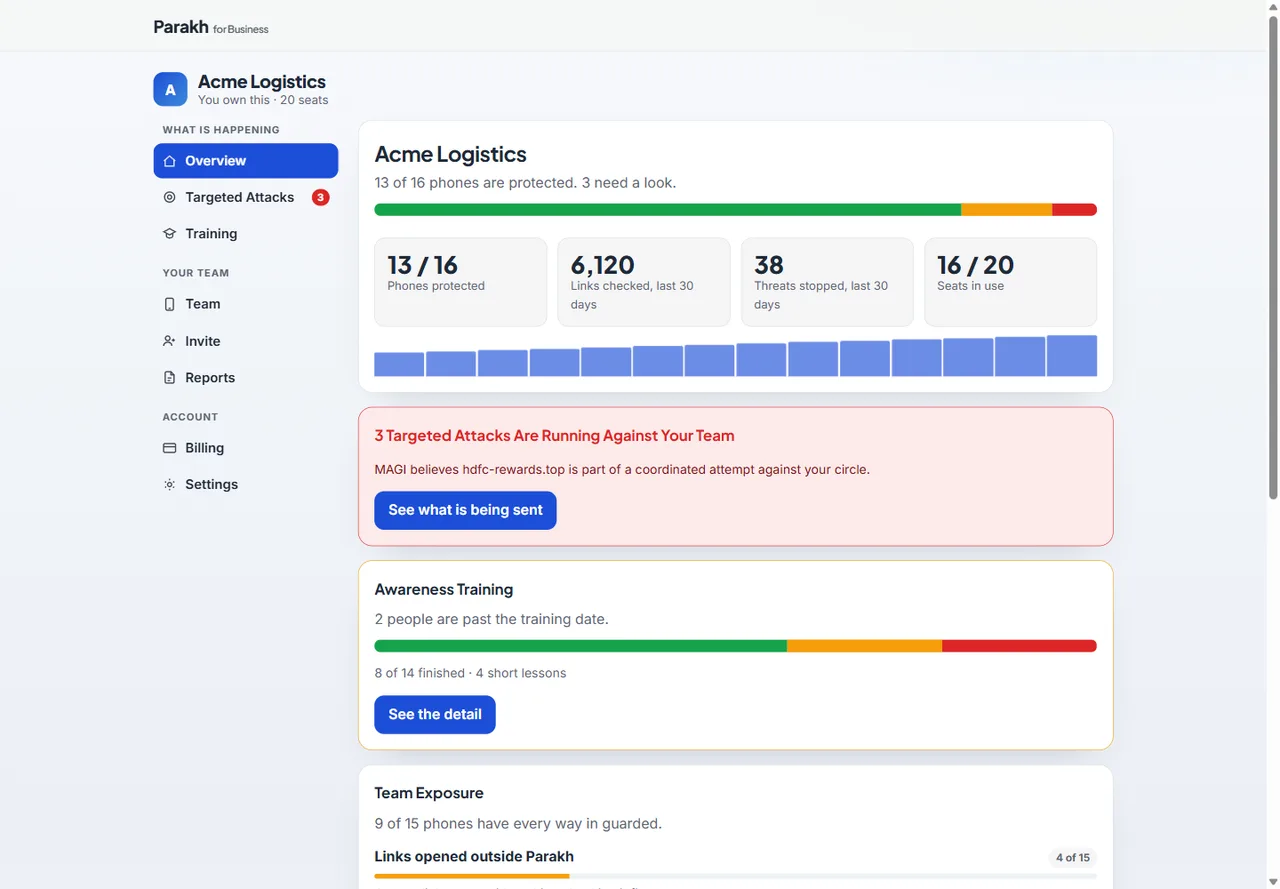
For a workplace, this matters most. Campaigns do not arrive one at a time — they arrive at your whole team on a Tuesday morning, from a handful of freshly registered domains. Recognising the shape means the second and third wave get caught too, so what reaches your Work Circle console is the size of the real attack rather than the one version that happened to be on a list.

The scammer’s playbook

We mapped the scammer's whole playbook. Parakh disrupts all of it.

Every scam runs on a chain — the bait, the tap, the fake page, the harvest, the cash-out. Break one link and the whole scam falls apart. Parakh is built to break all five.

100%of attack stages covered
61%of techniques blocked outright
39%more — caught & warned
18known techniques mapped

Stage 01

The Bait

A message arrives that you were not expecting.

Full Phishing links in SMS, WhatsApp & email
Full Malicious QR codes
Partial Urgency & authority lures (“KYC expired”)

Stage 02

The Disguise

Hiding where the link actually goes.

Full Shortened & masked links
Full Look-alike & spoofed domains
Full Redirect chains & cloaking
Partial Open-redirect abuse of trusted sites

Stage 03

The Fake Page

A copy convincing enough to type into.

Full Brand-new scam domains
Full Bank, wallet & courier impersonation
Full Fake fresh-padlock (HTTPS) sites
Full Mismatched & fake certificates

Stage 04

The Harvest

Taking the one thing they came for.

Full Password, OTP, UPI-PIN & card traps
Partial In-page data-stealing scripts
Partial UPI “receive money” reversal trick

Stage 05

The Foothold

Staying on the phone after the first hit.

Full Remote-access apps (digital-arrest scams)
Partial Malicious app sideloads
Partial “Your phone is infected” install pop-ups
Partial Malware via outdated device software

“Full” = detected and blocked outright. “Partial” = caught, weakened or clearly warned. On sideloaded apps we judge what an app can do — read your OTPs, watch your screen, install more apps — rather than guessing which brand it is pretending to be, because a wrong accusation costs more trust than it saves. The final transfer inside a bank or UPI app is the one link no browser can break, so Parakh breaks the chain earlier. Call-fraud & digital-arrest call protection are on the way.

“Doesn’t my phone already do this?”

It does some of it, and we use those defences too. Here is the gap they leave — the gap every scam that reaches you has already walked through.

Play Protect checks apps, not links

It watches what you install. It never sees the link in a text message — and almost every scam starts as a link, not an app.

Blocklists know yesterday’s scams

Browser warnings rely on a site already being reported. A scam domain registered this morning is not on any list yet — so Parakh judges the link itself, not its reputation.

In-app browsers bypass your browser

Tap a link inside WhatsApp, Instagram or Facebook and it opens inside that app. Whatever protection your real browser has never runs at all.

Family Protection

Watch over the people you love — without watching over their shoulder.

Scammers only need to get lucky once. Family protection is part of the one plan — so you can quietly look after the parents who taught you everything and the kids just finding their feet.

Pair in one tap

Share a code with a parent or child. No accounts to create, no tech setup on their side.

Know the moment it matters

If a loved one hits a scam, you get a quiet alert — just what you need to know, never their private browsing.

Care Mode for elders & kids

One switch: warnings read aloud, extra choices taken off the screen, bigger buttons, and the strongest protection turned on. Text size stays your phone’s own setting.

Most people who buy Parakh don’t buy it for themselves.

They buy it for a mother who forwards every message, or a father who answers every call. There is no separate family plan to work out — each phone gets its own licence, and a Circle brings them together so one person can look after everyone.

Set it up for your parents

One plan. Everything in it.

Everyone gets everything.

We are not going to sell you less protection to hit a lower price. There is one plan, it has every feature we have built, and it costs less than a cup of tea a month. Try it free for 30 days — no card needed — and cancel any time: cancelling stops the next charge and you keep every day you have paid for. No ads, nothing sold, ever.

Available now

Personal Guard

₹199/year, one phone

Around 55 paise a day.

First year · then ₹299 a year · 30 days free

  • Every link checked before it opens — from SMS, WhatsApp, email or a QR code
  • Cloud AI & live threat intelligence, with Google Safe Browsing as a second opinion
  • Risky links opened safely on our servers — never your device or your IP
  • Look-alike, hidden-redirect & fake-certificate detection
  • Device & app security watch
  • One phone
Start free trial

Available now

Family Guard

₹799/year, up to 5 phones

Under 45 paise a day per phone.

First year · then ₹1,199 a year · 30 days free

  • Everything in Personal Guard, on every phone
  • Watch over your parents and family, with an alert if they hit a scam
  • See at a glance who is protected and who needs a hand
  • One plan, one payment — nobody else has to set anything up
  • Up to 5 phones — five phones for the price of four
Start free trial

Coming soon

Guard+

Price announced when it ships

Everything in Guard, plus live call defence

  • Scam detection during voice and video calls
  • Defence against “digital arrest” and impersonation calls
  • Advanced on-device AI for pressure and manipulation tactics
  • Everything in Guard, always included

We will not take your money for something that does not exist yet. When it is ready, we will say so here.

Business

Custom

Per device, per year — priced to the size of your team.

For organisations protecting their people

  • Everything in Guard, on every device
  • Dashboard of who is covered and what needs attention
  • Reporting — scheduled, emailed, and downloadable for audit
  • Targeted attacks: what is being aimed at your people, and what was stopped
  • Policy guidance and rollout help for your team
  • Bulk enrolment — no per-person setup
Request a quote

Cancel any time. Cancelling stops the next charge — it never cuts your protection short. You keep every day you have paid for. How cancelling works.

Prefer not to auto-renew at all? Pick one year, no renewal — ₹399 for one phone or ₹1,599 for five. It simply ends when the year is up.

Your renewal price is locked. Google Play will never raise what you pay without telling you first — and when our prices change, you keep the price you signed up at for as long as you stay subscribed.

Prices include GST and are shown for India. Your country’s price is shown in Google Play before you pay. The first year is an introductory price for new customers; after that it renews at the standard price shown.

Covering a family? Family Guard covers up to five phones on one plan — nobody else has to set anything up or pay anything. We never keep or sell your links. Privacy Policy.

Private by design

Your safety is the product. Your data never is.

Parakh works on your device first. There are no ads, we don't sell data, and the basic checks never leave your phone.

No conversations

Share a link and Parakh reads only that link — never the chat around it.

No data selling

Your history stays on your device and is yours to clear at any time.

Cloud, minimised

For risky links, only a plain web address is checked — never your identity or IP.

Get Parakh

Protect your family today.

Parakh is available now on Android — download it and start your free 30 days. iPhone is on the way.

On iPhone? Leave your details and we'll tell you the day it lands.

Teams & Business

Protecting a team, school or business?

A business loses money a different way than a family does: a fake invoice, a changed bank account, a payment link that looks ordinary. Parakh for Business covers every phone on your team, with a weekly summary for the owner and a security record you can send to a customer. No device management, and nothing anyone has to watch.

See Parakh for Business